

511 Phone Shortcuts
Unlock the speed and convenience of 511! Discover the voice shortcuts and key commands that allow you to quickly access the information you need most on 511’s…
Image

Get instant, hands-free traffic and transit information with 511's voice-activated phone line. It's the easiest way to find your fastest route, bus departure time or driving time and avoid delays.

Unlock the speed and convenience of 511! Discover the voice shortcuts and key commands that allow you to quickly access the information you need most on 511’s…
Need help accessing the resources on the 511 phone service? We’ve got you covered. Check out our troubleshooting tips and safety advice to make the most of our…


Find the answers to frequently asked questions on the 511 Phone service, as well as details on how to use the Transit Departure feature and find Stop IDs.



511's most popular traveler information resources — real-time transit departure times and real-time traffic conditions — are available by calling 511 and asking for "Departure Times" or "Traffic Conditions." The 511 Phone system has many other useful resources, including Freeway Assist, Carpool and Vanpool information, Express Lanes information, transfers to all Bay Area transit paratransit agencies, and more.
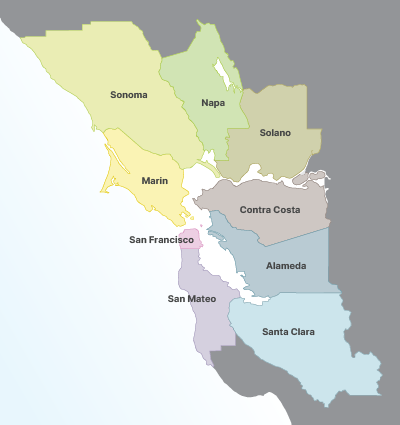
511's phone service is available throughout the San Francisco Bay Area, on nearly all cell phones and landlines. The nine Bay Area counties include:
You can request and receive departure time predictions on the phone. Call 511 and say "Departure Times" at the main menu. You will then be asked to enter your Stop ID, or if you don't know your Stop ID, you can say the agency and route name to use 511's backup help system to hear your departure times and learn your Stop ID number. You can also visit our Find a Transit Stop ID page.
The following agencies are currently included in 511 Departure Times:
A Stop ID is a unique number associated with a specific transit stop that 511 uses to identify the stop for which you want to receive departure time predictions. This ID automatically includes your direction of travel (i.e., the side of the platform or street the stop is on). For example, Stop ID #16996 identifies the outbound platform at Van Ness Station. When you enter this ID number, 511 Departure Times will play predictions for every outbound transit line that stops at Van Ness Station. Stop ID #15419 will play predictions for inbound service at Van Ness Station. Also, Stop IDs are transit agency-specific, so stops served by multiple agencies will have at least one unique Stop ID per agency.
To get your Stop ID, call 511 and say "Departure Times." When prompted, say your agency and route, and use the backup help system to identify your stop. After hearing the predicted departure times for your stop, 511 will play your stop's ID number. You can also visit our Find a Transit Stop ID page.
Stop ID decals for AC Transit, Dumbarton Express, Fairfield and Suisun Transit (FAST), Golden Gate Transit, Marin Transit, Napa VINE Transit, SamTrans, SolTrans, Muni, Tri Delta Transit, VTA and WestCAT are currently installed at bus stop signs, shelters and poles.
Some agencies post Stop IDs that differ from those used by 511, but you can use the following guidance to figure out the 511 Stop ID at your bus stop:
BART, Caltrain and Wheels are continuing to explore decal designs appropriate for their rail stations and bus stops.
If you don't see a Stop ID decal, call 511 and say "Departure Times." When prompted, say your agency and route and use the backup help system to identify your stop. After hearing the predicted departure times for your stop, 511 will play your stop's ID number.
Periodically, you might not receive predictions after calling 511 to request departure times. Most often, this is because the stop you requested is not predicted to have any departures within 90 minutes of the time of your request. 511 does not provide predictions greater than 90 minutes. Also, you may not receive predictions when the real-time prediction device on the vehicle(s) serving your stop is not working. However, if you receive this message when routes are departing the stop, or if you receive a message saying that the system is unavailable, please contact us so that we can look into the problem.
You can use cross streets on the 511 phone service to get departure time predictions, but only through the backup help menu. To access the backup help system, say your agency and route at the Transit Departures menu. You will then be prompted to say your direction and cross streets to obtain your departure times. If you don’t know your direction, just say the route name, and the system will prompt you to select your direction from a list of directions to choose from. However, if you use a Stop ID instead, you can get your departure times instantly, without needing to say your agency name, route number, or location.